
Microsoft Teams is a team collaboration application developed by Microsoft as part of the Microsoft 365 family of products, offering workspace chat and video conferencing, file storage, and integration of proprietary and third-party applications and services.
Access to Microsoft Teams
Current faculty, staff, and students have access to Microsoft Teams via a web browser or by installing the application on their devices.
Access Teams Through a Web Browser like Chrome/Firefox/Edge
Sign in to your UF email at:
https://mail.findlay.eduClick the App icon (3x3 dotted box) in the upper left corner of your screen.
Select Microsoft Teams.
Install the Desktop Application
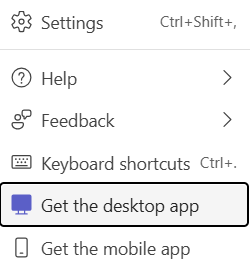
While in Teams through your browser (steps above), click the 3-dot menu in the upper-right corner of the screen next to your user icon.
Select 'Get the desktop app'.
Save the installation file.
Open the file and follow the on-screen prompts to finish the installation.
After installation, open Microsoft Teams and sign in using your UF email address and password.
Microsoft Teams Video Training
The following link lists several Microsoft Teams video trainings:
Contact Technology Support Services
If you have any questions or issues, contact Technology Support Services:
- Phone: 419-434-4357 x1
- Email: helpdesk@findlay.edu